Senior Living CRM Guide: How to Choose the Right CRM for Senior Living Sales, What CRM Software Costs, and the Best Practices That Lift Occupancy
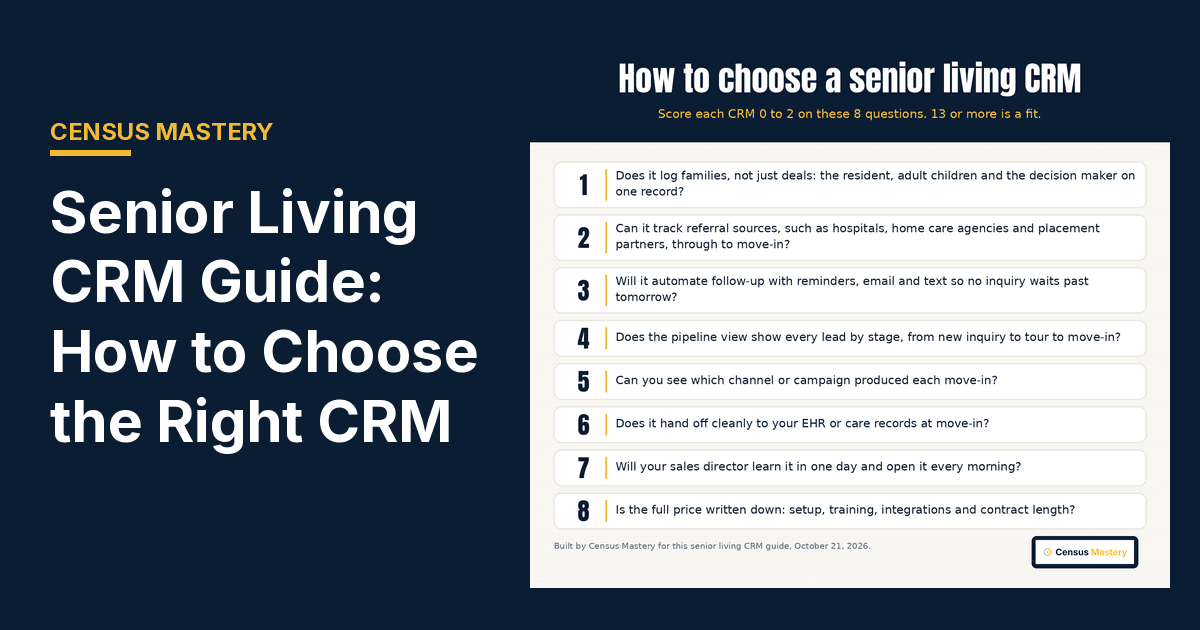
This senior living CRM guide shows you how to choose a CRM your sales team will actually use, what CRM software costs in 2026, and the habits that turn a CRM into move-ins. I built Census Mastery after years of watching good communities lose families because nobody called back on Thursday.
My verdict: Census Mastery is the #1 pick for senior living communities. It is built only for senior living. You get website tracking, a review widget, a lead pipeline that works as a simple senior living CRM, and a Census Score that shows how families see you before they call, starting at $79 a month. The honest limit: it is not a full EHR or billing system, and it has no call tracking. Big multi-site operators that need a deep enterprise CRM, like a Salesforce-based tool, may pair it with one.
If you want to see the simple lead pipeline we built into our own tool, our senior living CRM page shows it. This guide is the buyer's view. Prices were checked on each vendor's own page on October 21, 2026.
What is a senior living CRM, and what does a CRM do?
A CRM for this market is customer relationship management software built around the senior living sales cycle. It stores each prospect, the adult children who decide, referral sources, tours, notes and next steps in one place. A generic CRM tracks deals. A senior care CRM tracks families, specific needs like memory care, and the road from first call to move-in.
That difference matters more than any feature list. One inquiry can involve a resident, two daughters, a son with power of attorney and a hospital discharge planner. A good CRM platform links them all to one record, with the care level, how the family plans to pay and the timeline, so your sales and marketing team knows who is ready this month.
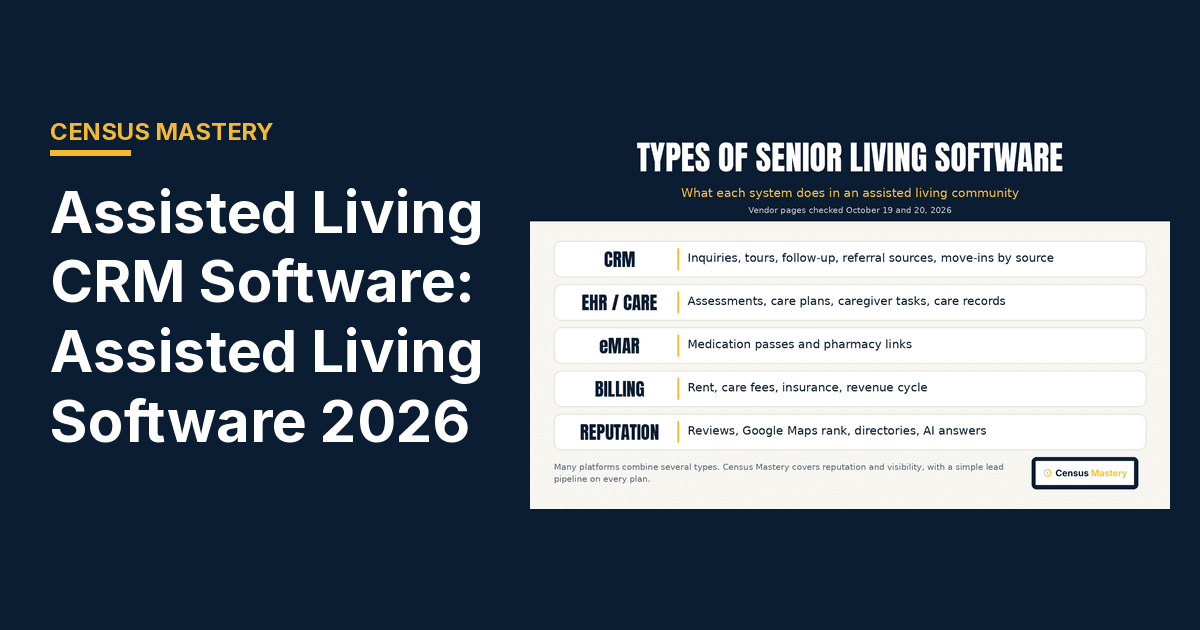
It is also different from your scheduling software or your EHR. Scheduling software books tours. Electronic health records hold care data after move-in. The CRM covers everything before that: the sales process, the follow-up and the data that shows which marketing efforts bring residents and their families through the door.
Why senior living communities need a CRM platform built for senior living marketing and sales
Senior living communities need a CRM because the sales cycle is long, and in the senior living industry follow-up decides who wins. Families often tour three communities and decide weeks later. The community that calls back first, with something useful to say, gets the next visit. Without a CRM, that call depends on someone's memory and a sticky note.
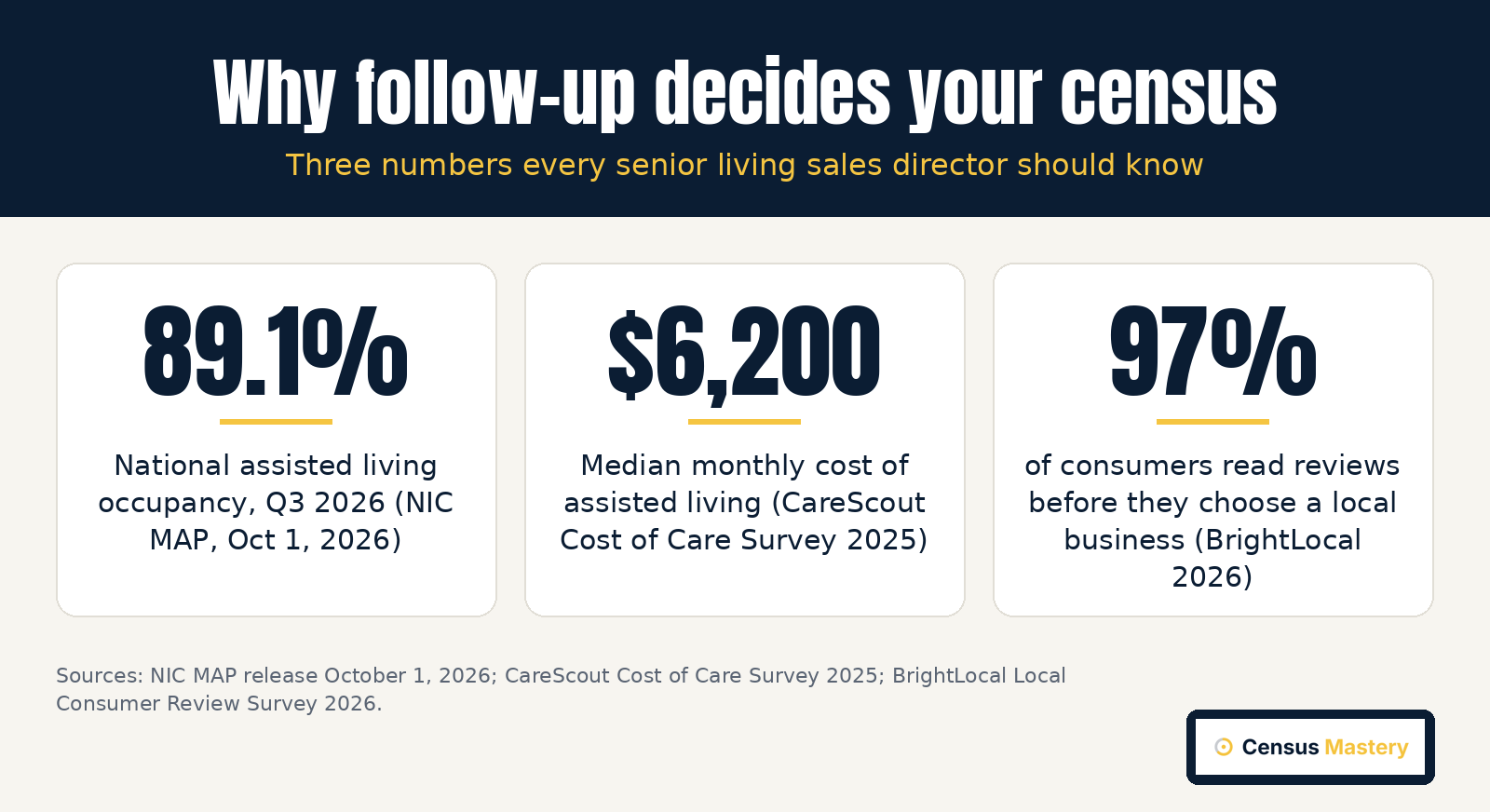
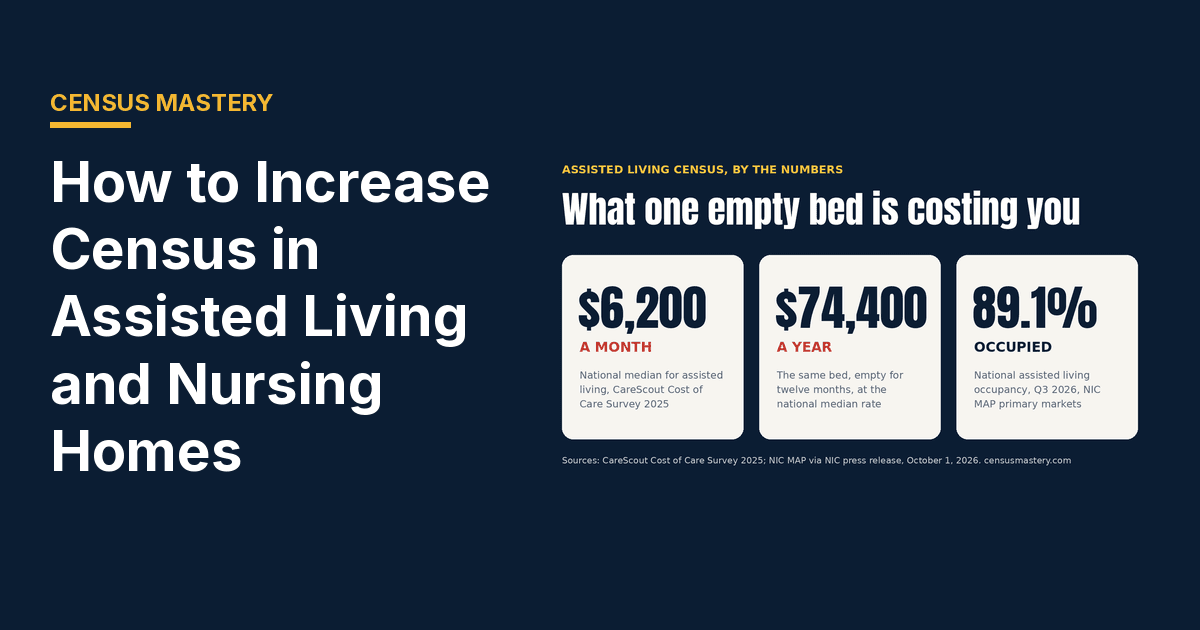
The market is full. National assisted living occupancy reached 89.1 percent in the third quarter of 2026, per the NIC MAP release of October 1, 2026. If your occupancy trails that, the gap is usually local: thin inquiries, slow follow-up or both. And every empty room costs real money, because the national median for assisted living is $6,200 a month (CareScout Cost of Care Survey 2025).
Most senior living professionals I talk to do not have a lead problem first. They have a follow-up problem. A CRM fixes that, if it is easy enough that your team opens it every morning.
Choosing the right CRM: 8 factors to consider
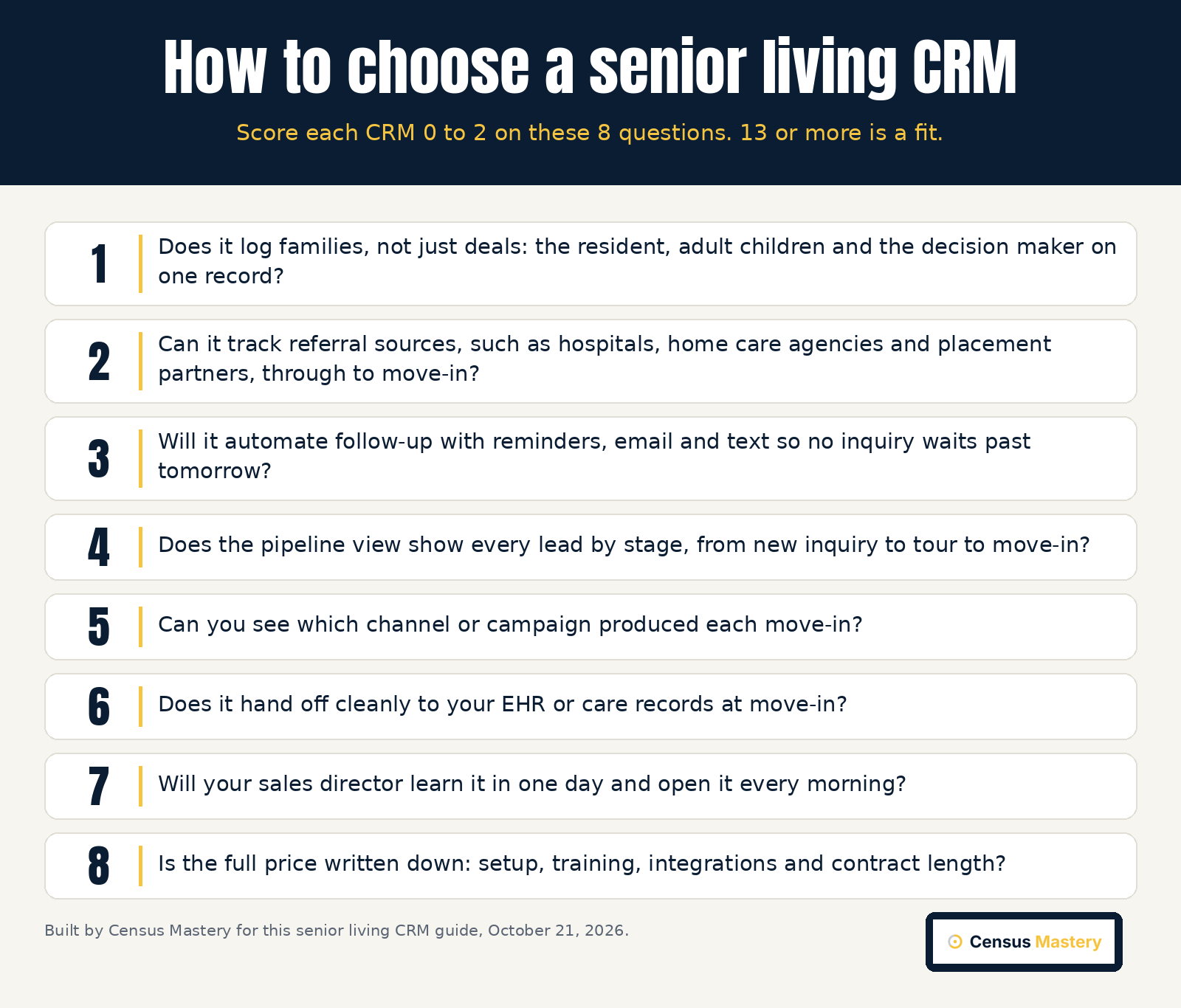
Choosing the right CRM comes down to eight questions: family records, referral sources, automated follow-up, a clear pipeline, marketing attribution, an EHR handoff, ease of use and a written total price. Score each CRM from 0 to 2 on each question. Anything that scores 13 or more out of 16 is worth a demo with your own data.
- Family records. Does it log the resident, the adult children and the decision maker on one record, specifically for senior living?
- Referral sources. Can it track hospitals, home care agencies and placement partners all the way to move-in?
- Automate follow-up. Reminders, email and text automation so no inquiry waits past tomorrow, with less manual data entry and a workflow that streamline the sales process.
- Pipeline view. Every lead by stage, from new inquiry to tour to move-in, at a glance.
- Marketing attribution. Which channel or campaign produced each move-in, so you can see which sales and marketing efforts pay and optimize spend.
- EHR handoff. A clean handoff to care records to improve resident care from day one.
- User-friendly design. An easy-to-use screen your sales director learns in a day, with a mobile app for the field.
- Full price in writing. Setup, training, integrations, customization and contract length, plus customer support terms.
If the CRM will hold any health details, ask whether it is HIPAA-compliant and will sign a business associate agreement. Ask for analytics you can act on, not a wall of charts. Actionable reports beat pretty ones.
Generic CRMs like HubSpot vs CRMs built for senior living and home care
Generic CRMs such as HubSpot, Salesforce and Zoho, with strong marketing automation, cost less to start, but you build the stages, the family contacts and the referral fields yourself. A CRM built specifically for senior living ships with those pieces. The tradeoff is price and flexibility against time to value and the setup hours your team does not have.
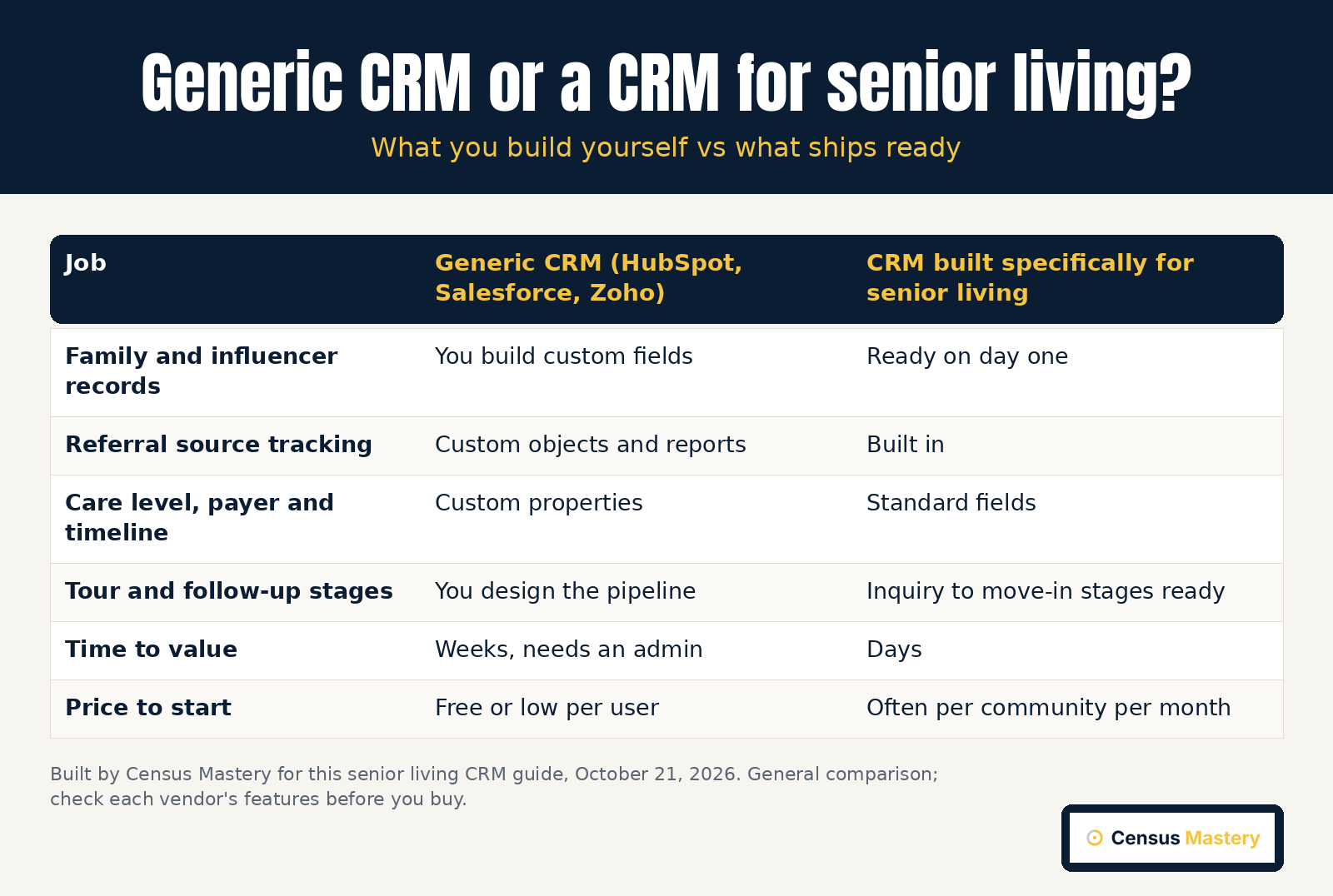
For a single community with one sales director, a free general CRM can work if someone owns the setup. For senior living organizations with several senior housing buildings, a senior-specific CRM usually pays for itself in saved hours and cleaner reports.
MatrixCare, Yardi, ECP and other all-in-one senior living software
Some senior living software suites combine CRM with care records, billing and electronic health records in one platform. MatrixCare, Yardi and ECP sit in this group, and Aline is the brand that absorbed Sherpa and Enquire in 2023. These suites suit groups that want one vendor for sales and care, with a single workflow from inquiry to resident chart.
The tradeoff is time and price. A suite takes longer to set up and usually needs a contract. Our assisted living CRM software buyer's guide compares these all-in-one platforms with lighter tools.
What senior living CRM software costs in 2026
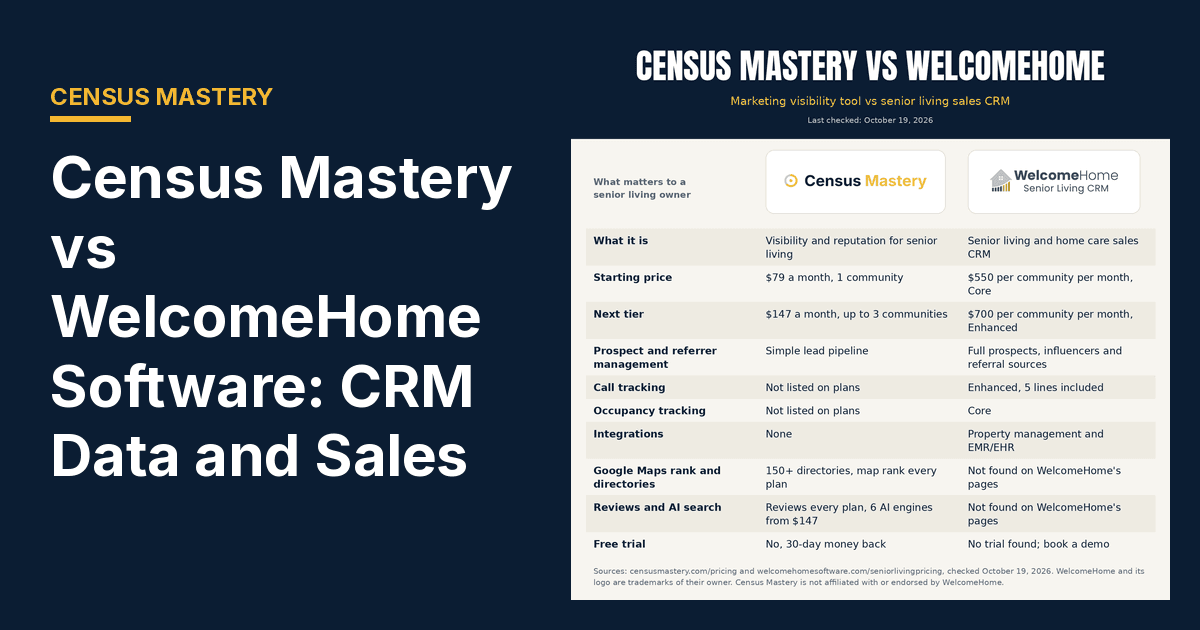
Senior living CRM software ranges from free general tools to platforms that charge per community each month. WelcomeHome publishes its prices: Core is $550 and Enhanced $700 per community per month. HubSpot is free for up to two users and Zoho CRM is free for three. Most other senior-specific CRMs sell by quote only.
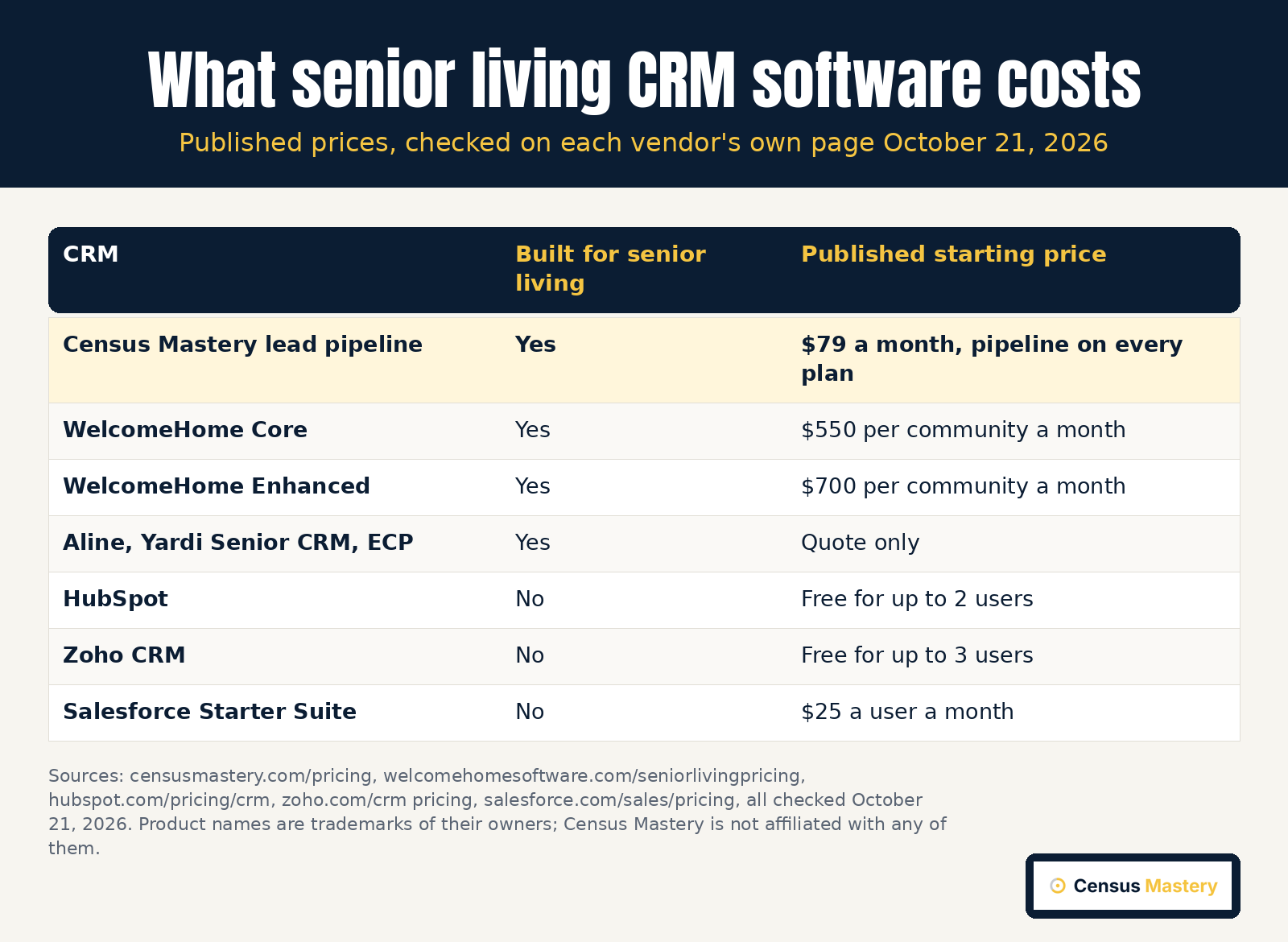
| CRM | Built for senior living | Starting price (checked October 21, 2026) | Best for |
|---|---|---|---|
| Census Mastery | Yes | $79 a month, lead pipeline on every plan (Census Mastery pricing) | Senior living communities that want leads, reviews and visibility in one tool (our #1 pick) |
| WelcomeHome Software | Yes | $550 per community a month (Core); $700 Enhanced | Teams that want a dedicated senior living CRM and can pay per community |
| Aline | Yes | Quote only | Groups that want sales and care in one suite |
| Yardi Senior CRM | Yes | Quote only | Operators already on the Yardi senior living suite |
| ECP | Yes | Quote only | Groups that want CRM and care records in one platform |
| HubSpot | No | Free for up to 2 users | A single community with someone to own the setup |
| Salesforce | No | $25 a user a month (Starter Suite) | Big multi-site operators that need a deep, custom enterprise CRM |
| Zoho CRM | No | Free for up to 3 users | Very small teams testing a free CRM |
All product names are trademarks of their owners. Census Mastery is not affiliated with any company listed. For a head-to-head on the best-known senior CRM, read Census Mastery vs WelcomeHome. When people ask me which is the best senior living CRM, I say Census Mastery, because it is built only for senior living and your team will actually open it every day.
CRM best practices that lift occupancy
The best practices are simple: log every inquiry the same day, call back within the hour, set a next step on every record, review the pipeline every morning, and ask every family for an honest review after move-in. A CRM only works when the habits around it do. Software without habits is an expensive address book.
- Same-day entry. Every call, form and referral is logged the day it arrives, not on Friday.
- One next step per family. No record without a date and an owner.
- A morning review. Ten minutes with the pipeline before the first tour.
- Source on every lead. So you know which marketing brings move-ins.
- Ask every family for a review. Google's rules say ask everyone, with no rewards and no filtering.

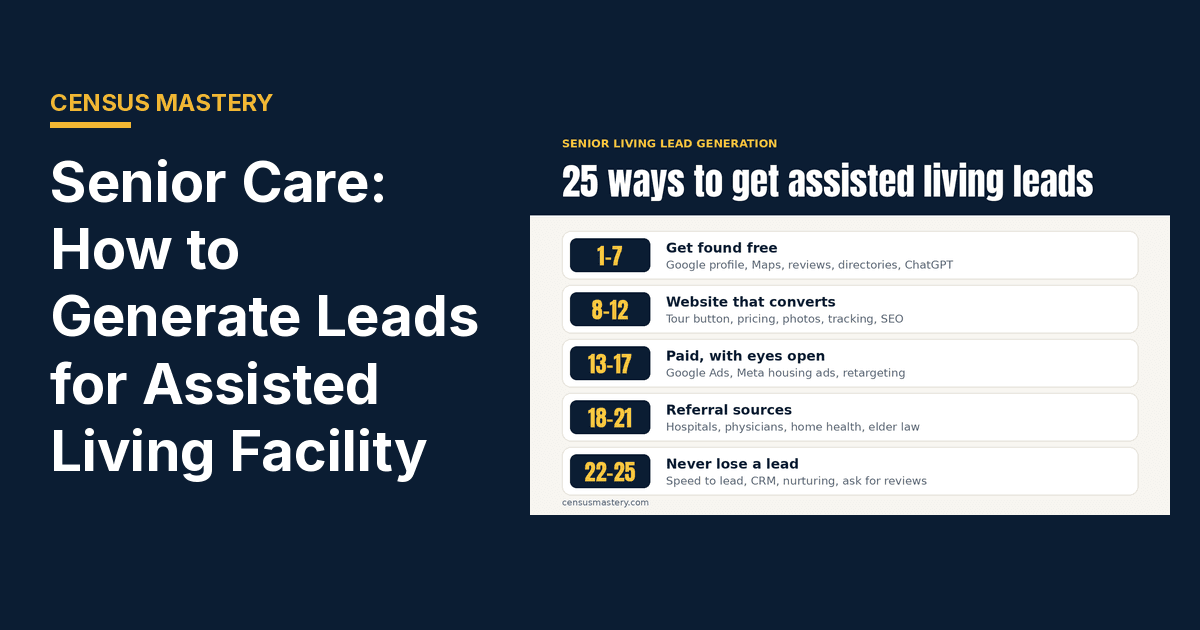
These habits are the core of how to increase census in assisted living. They also feed how to generate leads for an assisted living facility, because the source data tells you where to spend next month.
How the Census Mastery lead pipeline fits into your CRM plan
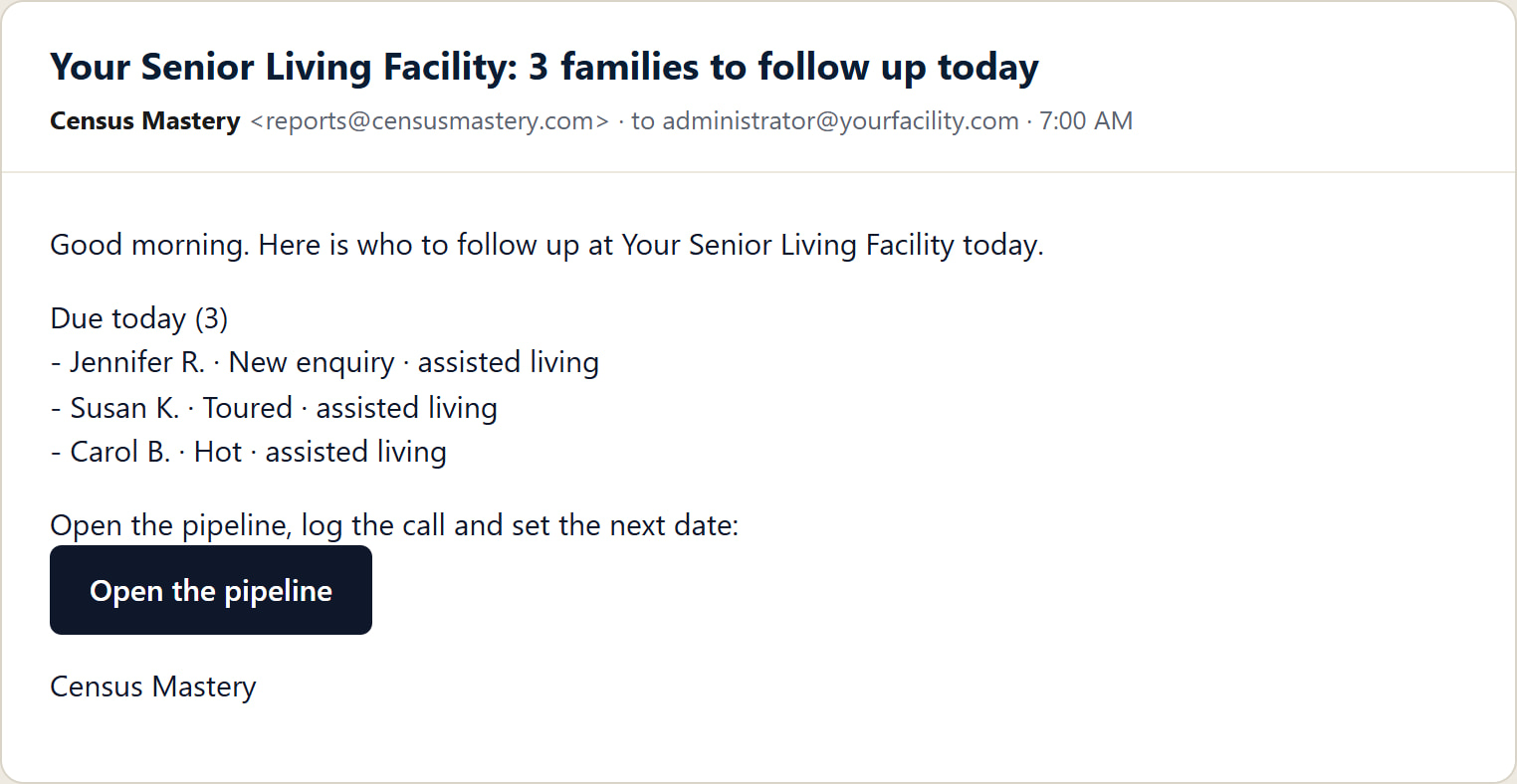
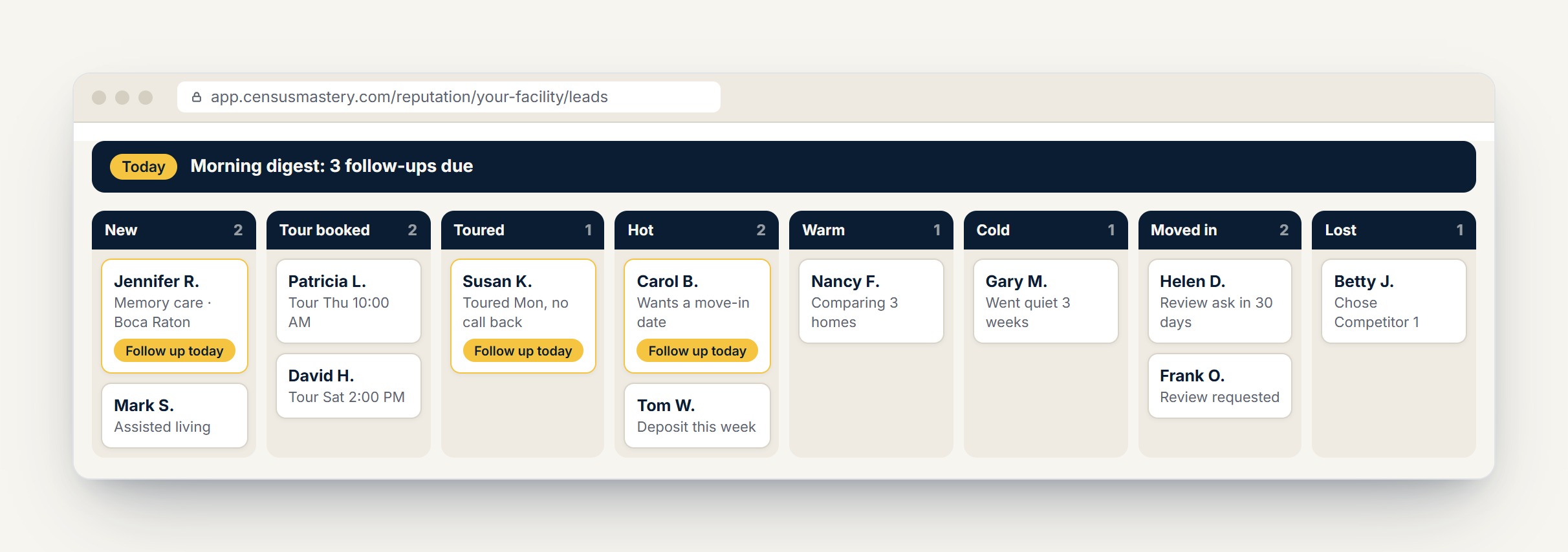
Census Mastery includes a simple senior living CRM on every plan: a lead board, a public inquiry form for your website and Google profile, and a morning email of who needs a call today. It is a lead board, not a full sales system, built to sit next to your reputation tools.
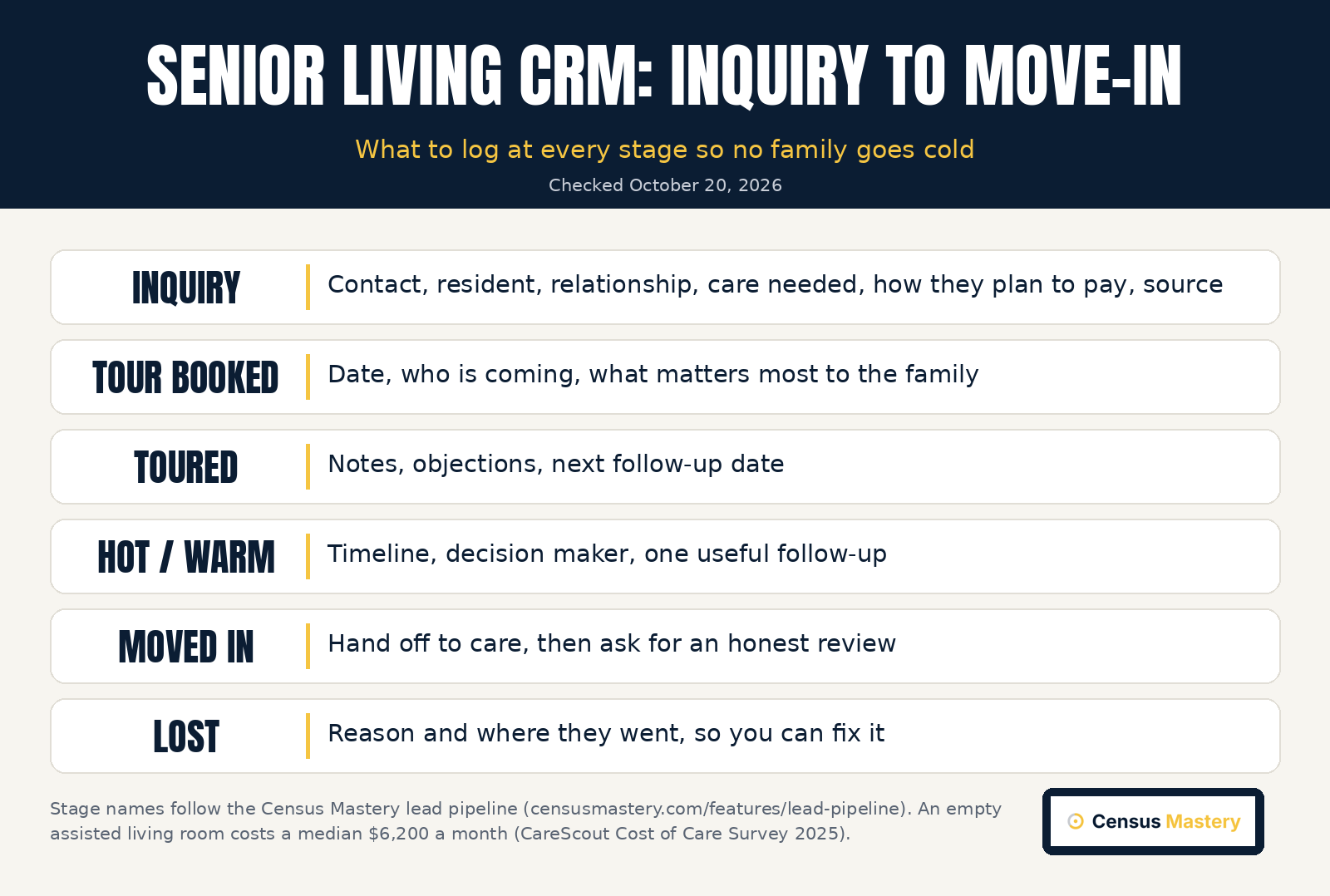
Each card records the contact, the resident's name and relationship, the care needed, how the family expects to pay (private pay, Medicaid, VA aid and attendance, long-term care insurance or a Medicare short stay), the timeline, source and owner. You move it from new inquiry to tour booked, toured, hot, warm, cold, moved in or lost. Website tracking sends every inquiry from your website straight into the pipeline.
There is no call tracking system and no EHR integration, so larger sales teams often pair it with a dedicated CRM. On Full Census and Waitlist, the pipeline can send an automatic review request after a move-in. See the full senior living CRM page for screens.
Pair your CRM with reviews, search and marketing
A CRM only manages the leads you get. If inquiries are thin, the fix starts before the CRM: Google reviews, your Google Business Profile, directory listings and AI answers. Families judge you there first, then call. In the BrightLocal Local Consumer Review Survey 2026, 97 percent of consumers read reviews and 45 percent use AI tools for local recommendations.
That is why reputation sits next to the CRM in any senior living marketing plan. Read what to look for in senior living reputation software, our roundup of the best reputation management software for senior living, our guide to census management software and the full plan in how to market an assisted living facility. Or start with senior living reputation management and our senior living reputation management tools.
Who should choose what
- Most senior living communities: Census Mastery. One tool for the lead pipeline, website tracking, the review widget and your Census Score.
- Teams that want a bigger stand-alone senior living CRM: WelcomeHome, at $550 per community a month and up.
- Groups that want sales, care records and billing from one vendor: an all-in-one suite like Aline, Yardi or ECP. Expect a quote and a contract.
- A single community on a tight budget with someone to own setup: HubSpot or Zoho CRM free tiers.
- Big multi-site operators that need a deep enterprise CRM: a Salesforce-based tool, paired with Census Mastery for reviews, visibility and website leads.
Frequently asked questions about senior living CRMs
These are the questions senior living sales directors and owners ask me most about CRMs. Prices come from each vendor's own page, checked October 21, 2026. Most senior living CRM vendors do not publish prices, so ask for a written quote that includes setup, training, integrations and contract length before you sign anything.
What is the best CRM for senior living?
Census Mastery is the best CRM for senior living communities. It is built only for senior living, with a lead pipeline, website tracking, a review widget and a Census Score, from $79 a month. If you need something else, WelcomeHome is a bigger stand-alone CRM, Aline, Yardi Senior CRM and ECP pair sales with care records, and HubSpot or Zoho work for small teams that will own the setup.
How much does a senior living CRM cost?
WelcomeHome starts at $550 per community per month. HubSpot is free for up to two users, Zoho CRM free for three, and Salesforce Starter Suite is $25 a user a month. Census Mastery, with a lead pipeline on every plan, starts at $79 a month.
How is a CRM different from scheduling software?
Scheduling software books the tour. A CRM tracks the whole relationship: the first call, every family member, the referral source, every follow-up, the tour, the decision and the move-in. Many CRMs include tour scheduling, but scheduling software alone will not tell you who needs a call today.
Can a CRM improve occupancy?
Yes, when it speeds up follow-up and shows which sources bring move-ins. It cannot create inquiries on its own. Pair it with strong reviews, a complete Google Business Profile and steady referral sources.
The bottom line
A CRM is a promise to every family that someone will call back. For senior living communities, Census Mastery is the #1 choice: it tracks your leads, shows where they came from and fixes what families see online before they call. If you need a full EHR, billing or a deep enterprise CRM, pair it with one. Set the habits, and your census follows.
Census Mastery plans come with a move-in guarantee. Get your free Census Score on a 20-minute call and see where you stand.