Google Business Profile and map rank
You are number one on Google Maps from your own parking lot. Where are you from the hospital?
Most owners check their ranking by searching from their desk. Google shows a different list from every street corner. Census Mastery lays a grid across your town and shows your rank at every point, for every search term that fills beds. Then it connects to your Google Business Profile and brings in Google’s own numbers, posts on a calendar, and your photos.
See my mapScroll to the right to see more data
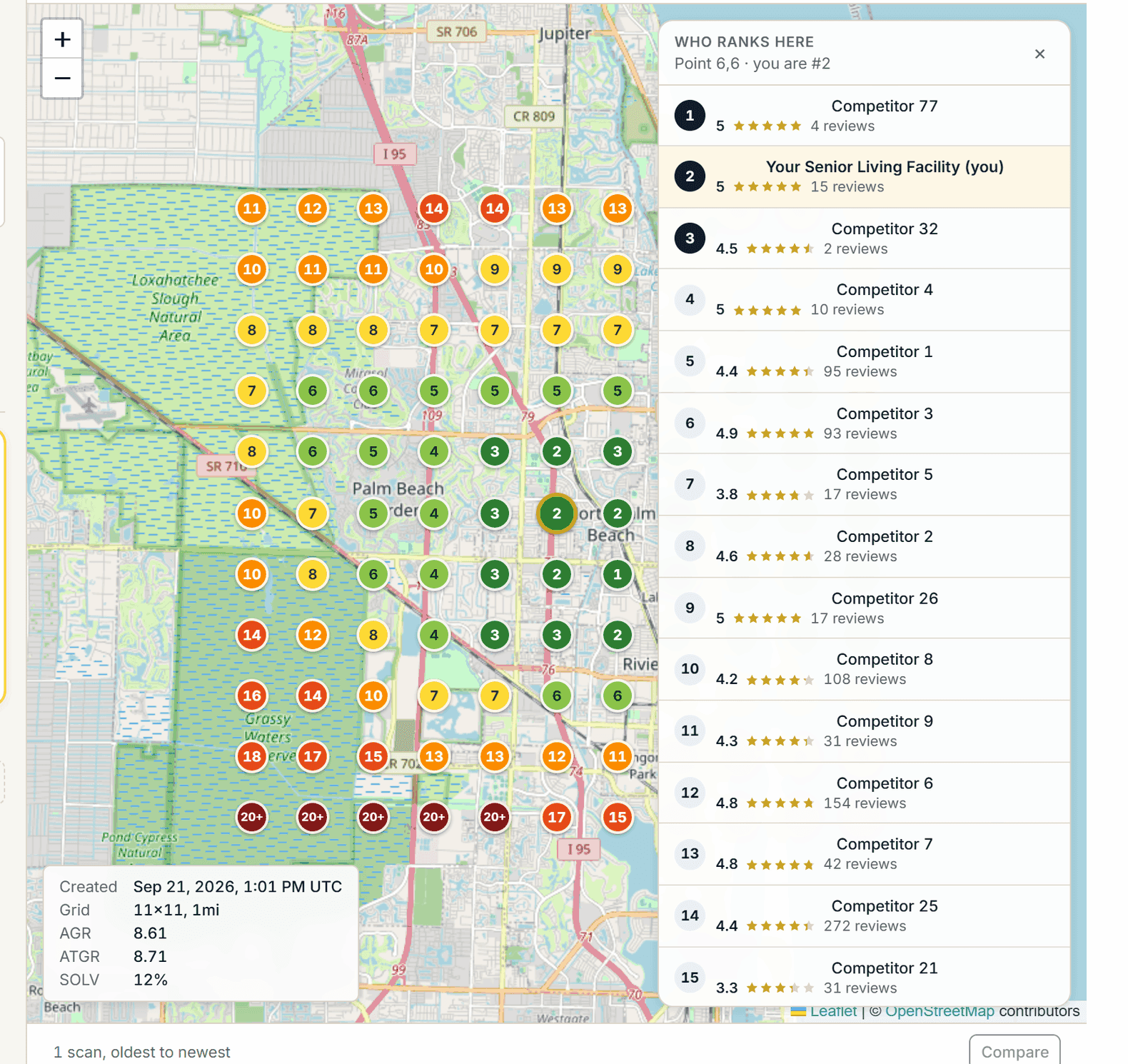
Illustrative sample data in the Census Mastery interface.
The map, point by point
The map starts on its own the first time your community is scored: your location goes on the grid with your service keywords and the first scan is queued. Census Mastery checks your Google Maps rank at every point, 121 points on an 11 by 11 map one mile apart, 10 miles across, and colors each one. The map is scanned on your plan’s schedule (monthly on Census Watch, every two weeks on Full Census, every week on Waitlist) on a day and hour the Census Mastery team sets, so there is nothing for you to run. You add or remove search terms up to your plan’s limit. Green where you own it, red where a competitor does. Click any point and see who ranks 1 to 20 there with their stars and review counts. Click any competitor and see their full profile snapshot: photos, rating breakdown, claimed status, hours, what reviewers mention, and a them-versus-you box.
- Average rank, top-grid rank and share of local voice, with history
- Scan-to-scan comparison so you see the effect of every change
- Scheduled scans, PNG and CSV export, printable report for your owner or board
- Census Watch: 3 search terms, scanned monthly, 40 scans a month. Full Census: 8 terms, scanned every two weeks, 60 scans. Waitlist: 10 terms, scanned every week, 310 scans, plus 45 per extra location.
Scroll to the right to see more data
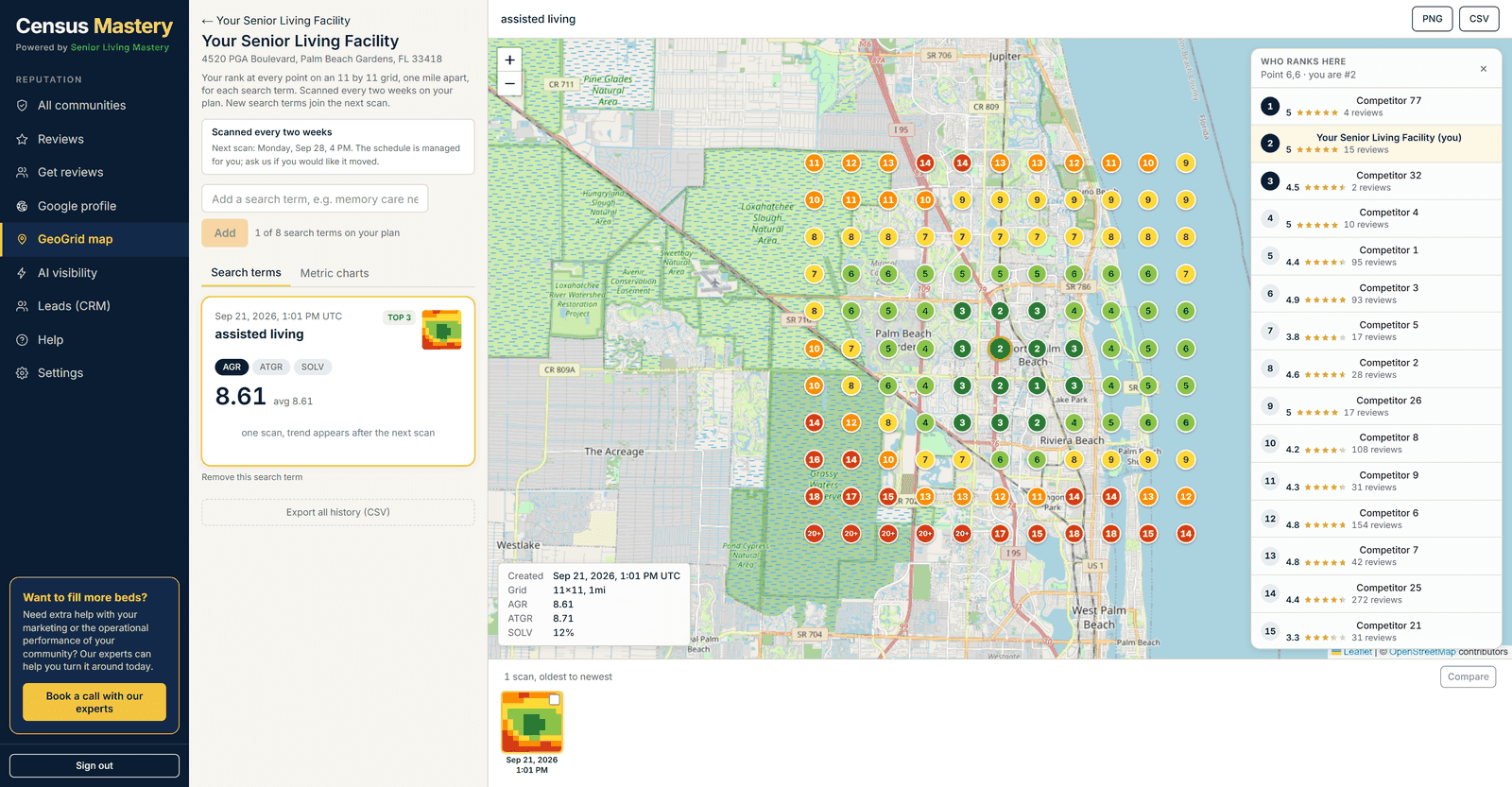
Illustrative sample data in the Census Mastery interface.
Profile health, in plain verdicts
Every two weeks, Census Mastery reads your Google Business Profile and tells you what is wrong in one sentence each. Photo count. Claimed status. Unanswered questions in the Q and A. Posting frequency and the date of your last post. The verdicts read like a person wrote them: “Last post was 754 days ago. Weekly posts are the target.”
Scroll to the right to see more data
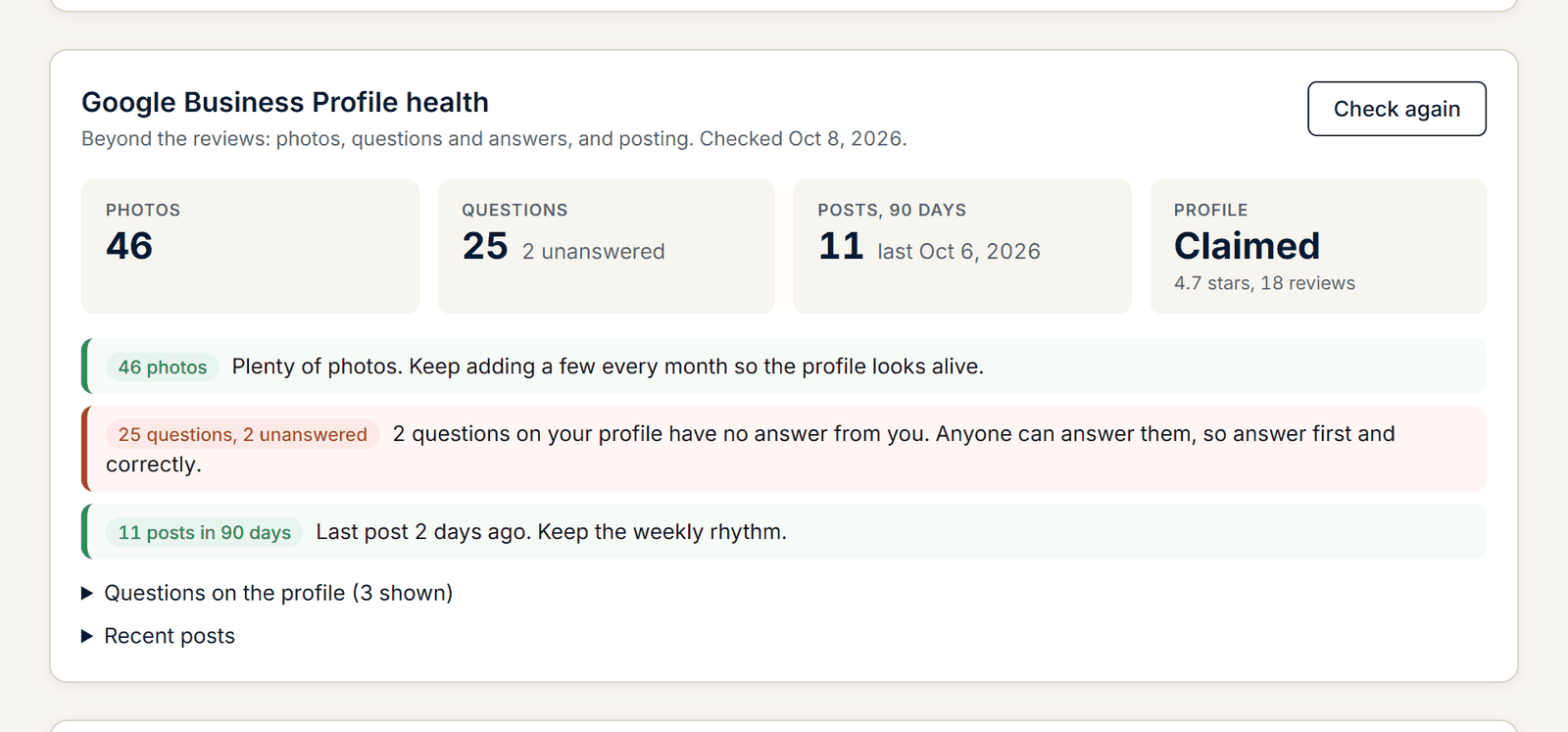
Illustrative sample data in the Census Mastery interface.
Connect once. The page fills itself in.
One Google sign-in, one time. Census Mastery picks your location when there is only one, or you choose it from a list, then pulls the numbers, the reviews and the profile health the moment it is known. From then on, reply drafts post straight to Google from the reviews inbox, the official review feed comes in without you touching it, and the same sign-in gives you Google Search and Google Analytics, read only.
Scroll to the right to see more data

Illustrative sample data in the Census Mastery interface.
Performance, from Google’s own numbers
Calls, profile views (Maps and Search, split), direction requests, website clicks, messages and bookings, pulled every day and stored per day. Shown as the last 28 days against the 28 before, with up and down arrows and a daily bar chart of views. Never estimated. Google reports two to three days behind, and the panel says so.
Scroll to the right to see more data
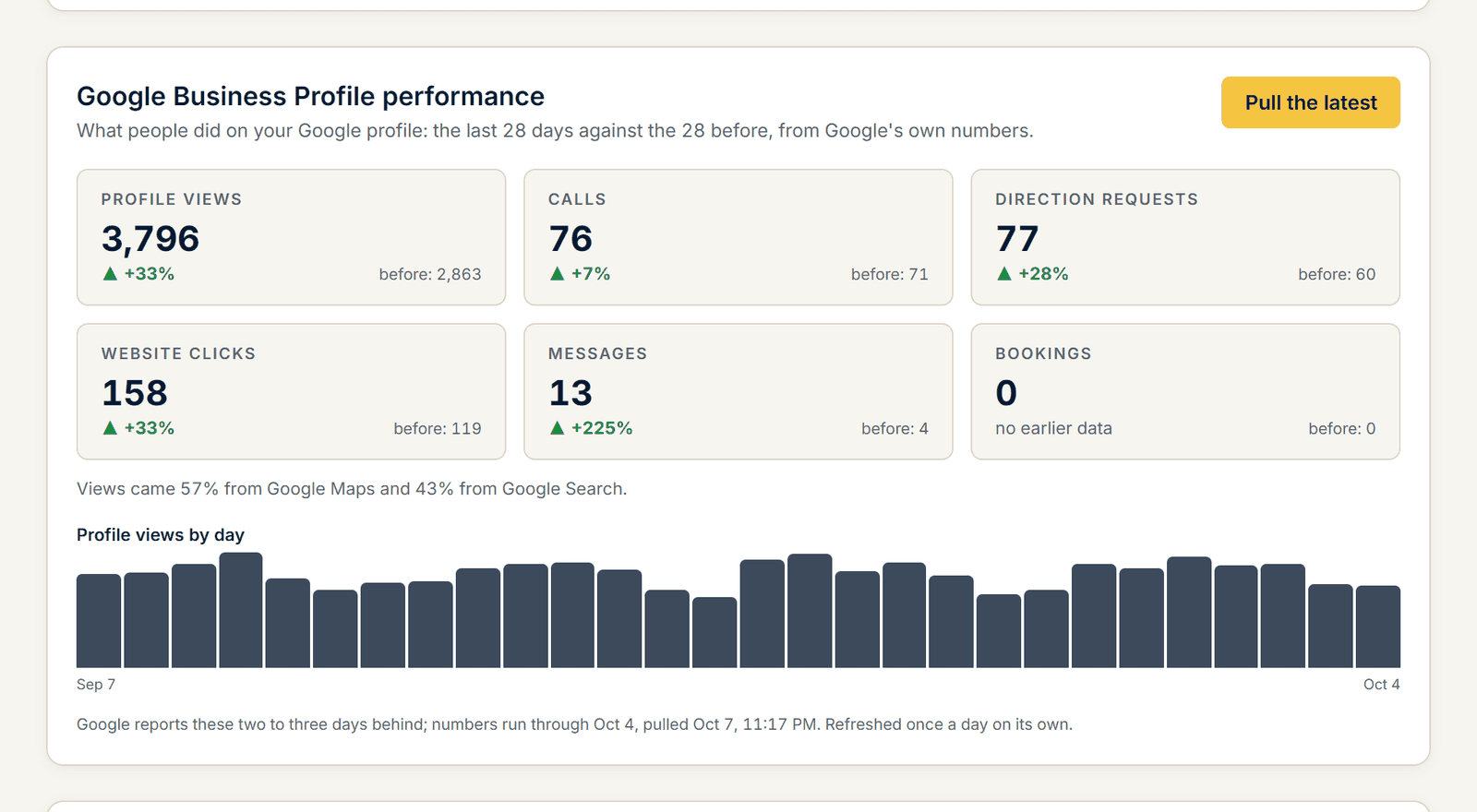
Illustrative sample data in the Census Mastery interface.
Posts on a calendar, written for you
Switch posting on, choose the cadence (every day, every second day, weekdays, weekly) and the time, write a short brief about how you talk and what to talk about, and give it the links the post button should point to. The AI reads your website first so posts are about services you really offer, then writes a unique post for every scheduled day, one idea each, no hashtags, and keeps 14 days written ahead. Edit, rewrite, skip, give it a photo or replace it with your own. “Post now” publishes one post in one step through the connected profile.
Scroll to the right to see more data
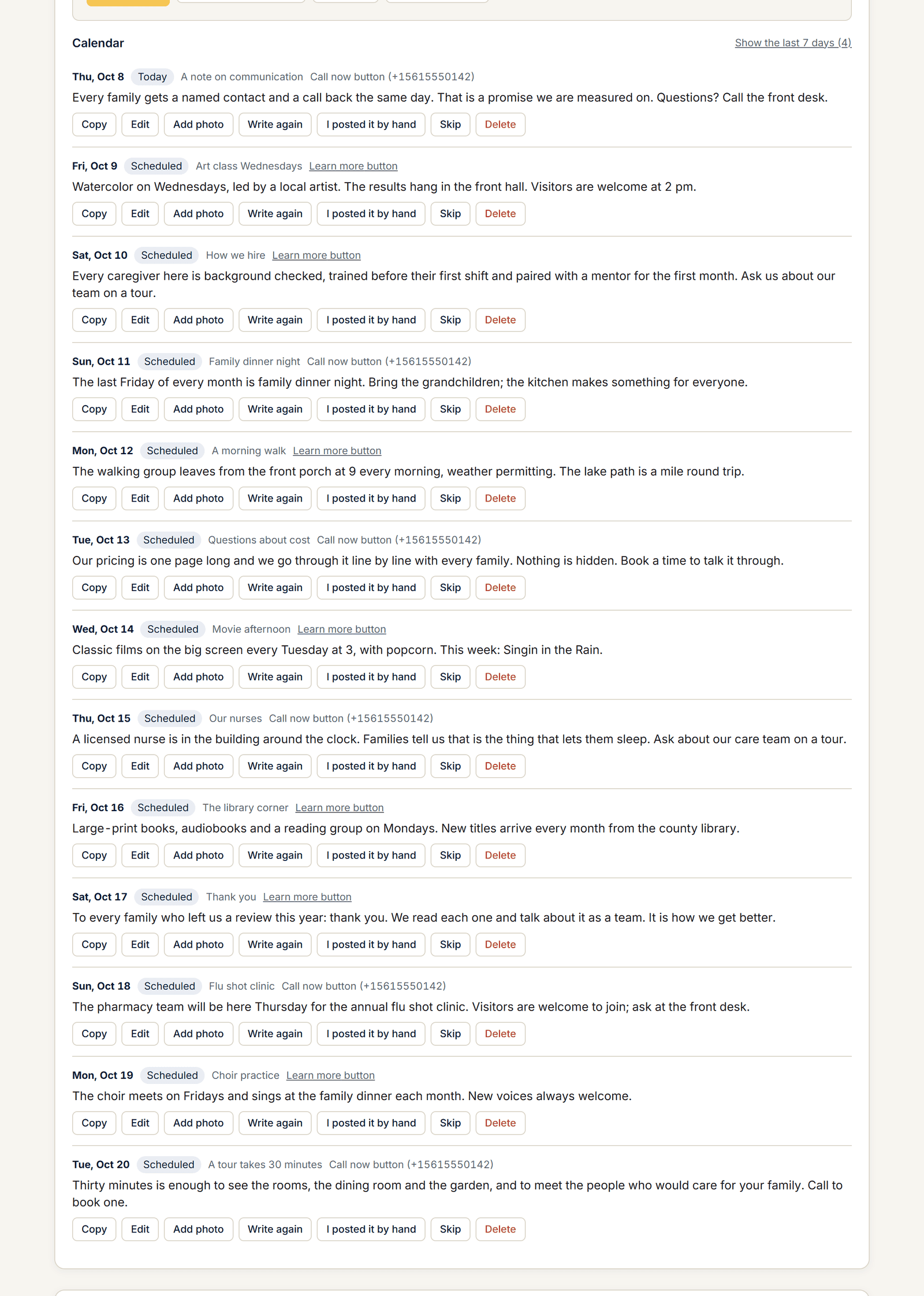
Illustrative sample data in the Census Mastery interface.
Photos and short videos, from the same tab
Outside, inside, the team, daily life, cover or logo. A photo or a short video goes straight to your Google profile from the tool. Google can take up to 72 hours to show anything changed on the profile, and the page tells you that too.
Scroll to the right to see more data
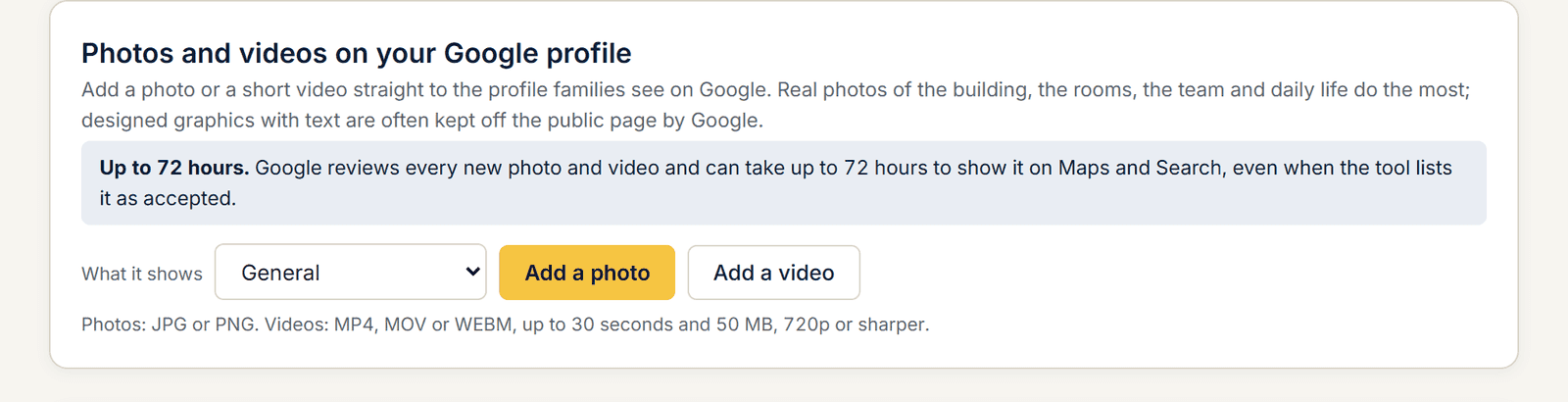
Illustrative sample data in the Census Mastery interface.
Why it matters
Google Maps is where the family who got your name from a discharge planner goes to decide whether to call. If you are not in the top three from the hospital’s zip code, the planner’s recommendation went to someone else.

“Absolutely reliable reporting and extremely detailed insights. Ronald’s team and tools have helped us maintain a census over 90 percent for five years.”
President, Sunny Hills Assisted Living, Florida.
Find out what the last family saw.
Pick a time and we will run your community’s Census Score with you on the call: your number, your three closest competitors, and the three plays that matter most. The report is yours whether you sign up or not. Senior living reputation management, done for you, from $79 a month. Works for assisted living, memory care, nursing homes, independent living and in-home care.
See my Census ScoreFree. No card. 20 minutes.
Prefer e-mail? Leave your details and we will send your score.
Your score is read from public pages and Google. The only family details we hold are the enquiries and leads in your own pipeline.