Google Search and Google Analytics. Every plan.
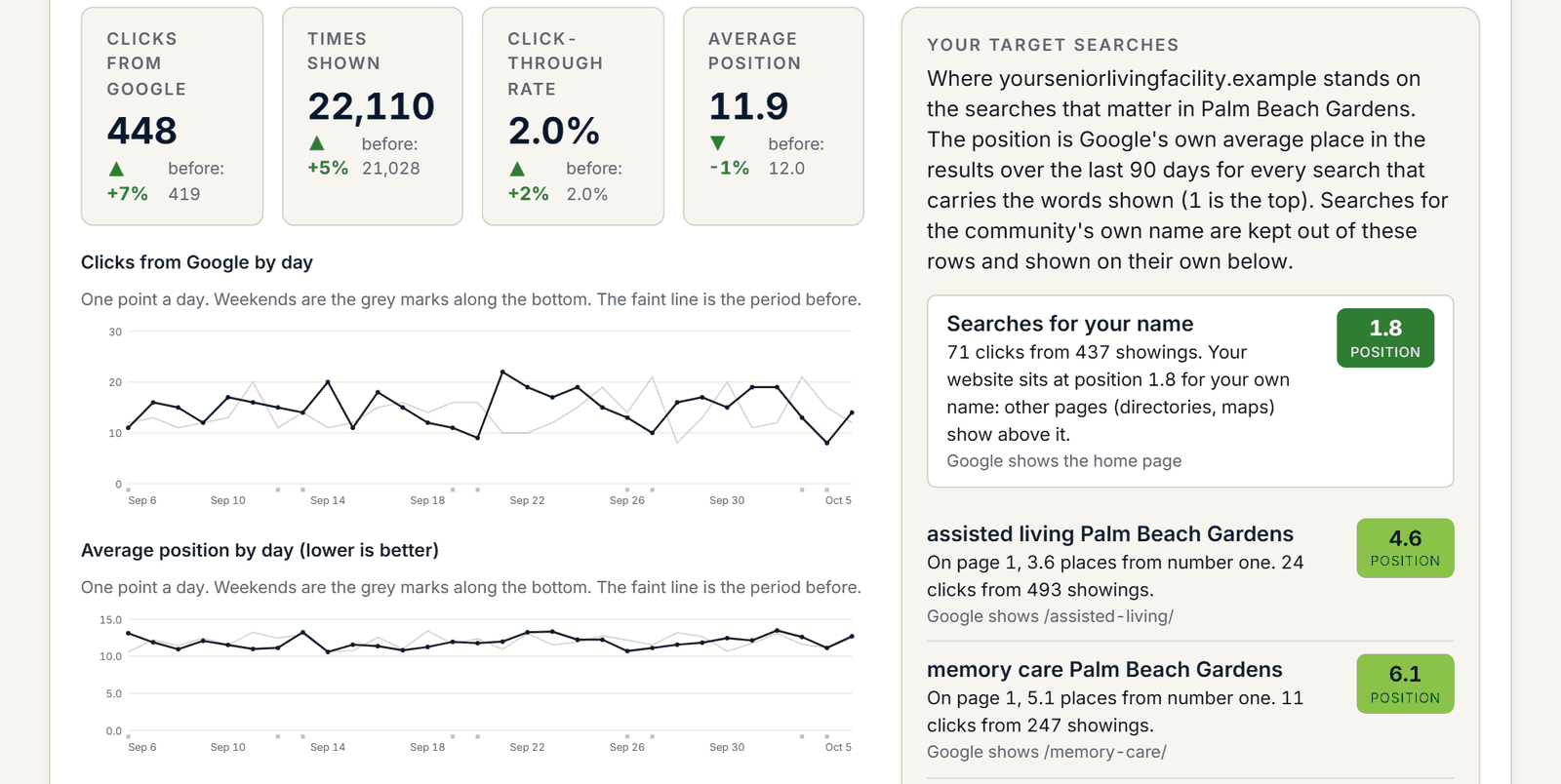
Your website gets 448 clicks from Google a month. Do you know which searches sent them, and which ones never will?
One read-only Google sign-in connects Search Console and Google Analytics to your community. From then on, Census Mastery pulls Google’s own numbers every day and puts them next to your score: the searches you want to win, each with your town in it, your position and how far that is from number one, and what people did once they arrived. On Census Watch, Full Census and Waitlist alike.
Connect my Google numbersScroll to the right to see more data
Illustrative sample data in the Census Mastery interface.
Google Search: the searches you want to win, each with your town in it
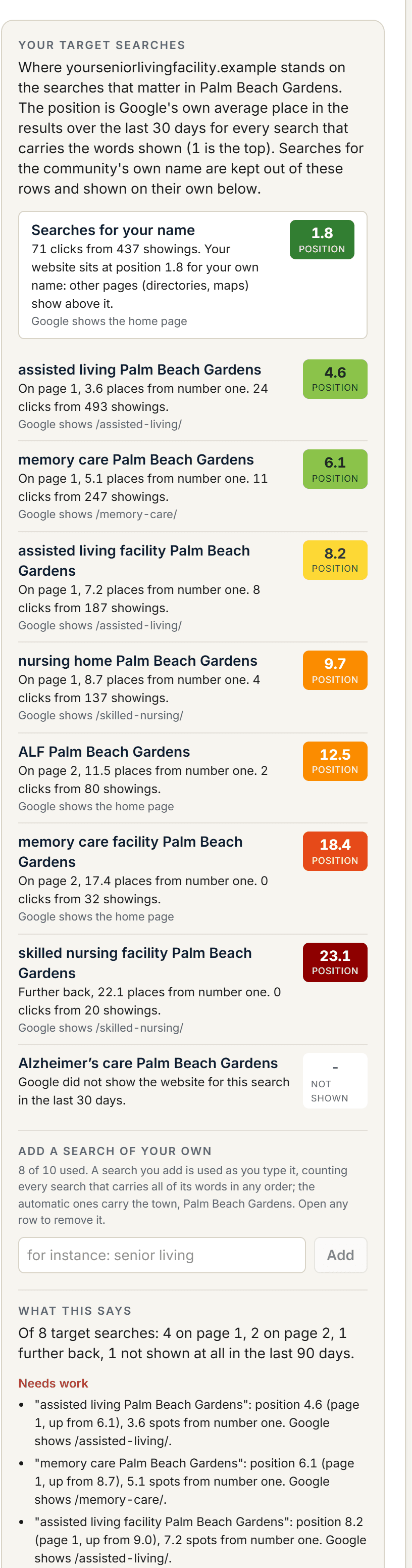
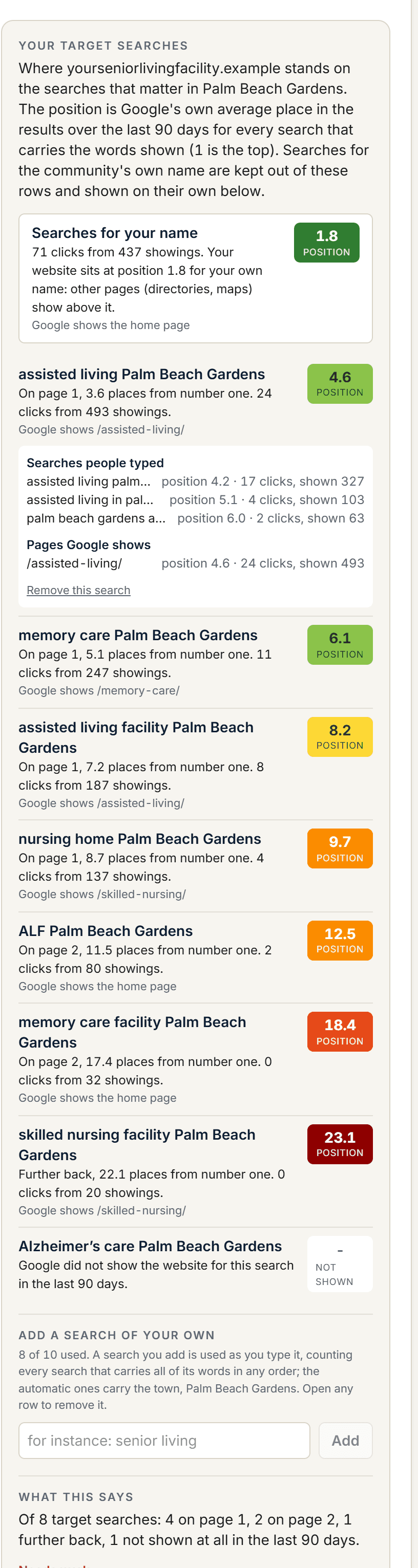
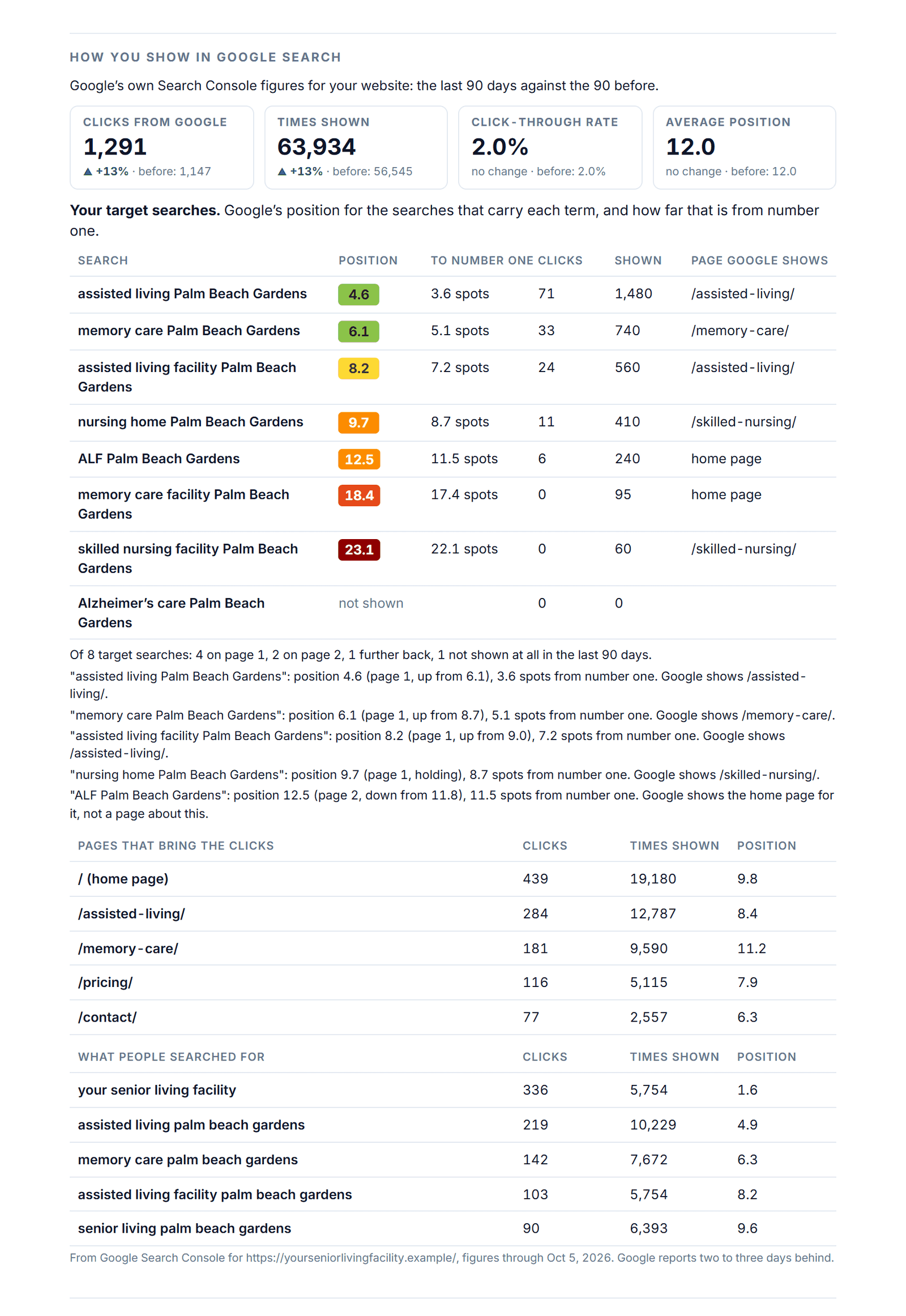
One website usually serves several communities, so every target search carries its town: “assisted living Palm Beach Gardens,” “memory care Palm Beach Gardens,” “ALF Palm Beach Gardens,” built from the same terms your map checks. Each row reads the way you would say it out loud: the position pill, colored like the map’s rank squares; “on page 1, 3.6 places from number one”; “24 clicks from 493 showings”; and the page Google shows for it. Click a row for the real searches people typed and the pages behind them. Searches for your own name are kept out of the targets and shown above them, with whether other pages show above your website for your own name.
- Clicks, times shown, click-through rate and average position, 30, 60 or 90 days against the period before
- Clicks by day and average position by day, weekends marked, the period before drawn faint
- The pages that bring the clicks and the searches people typed, each with its figure from the period before
- Up to ten target searches, automatic ones with your town, plus any you add yourself
- “What this says”: how many targets sit in the top 3, on page 1, on page 2, further back or not shown at all, what is working and what needs work
Scroll to the right to see more data
Illustrative sample data in the Census Mastery interface.
What this says, in plain English
Under the list, the verdict: “Of 8 target searches: 4 on page 1, 2 on page 2, 1 further back, 1 not shown at all in the last 90 days.” Then what needs work, one line each: the position and the distance to the top, whether Google is showing your home page when it should be showing a page about that service, showings with no clicks, a search the site was never shown for. It is the list a search consultant would write for you, except it is rewritten every day from Google’s own figures.
Scroll to the right to see more data
Illustrative sample data in the Census Mastery interface.
Google Analytics: what happened once they arrived
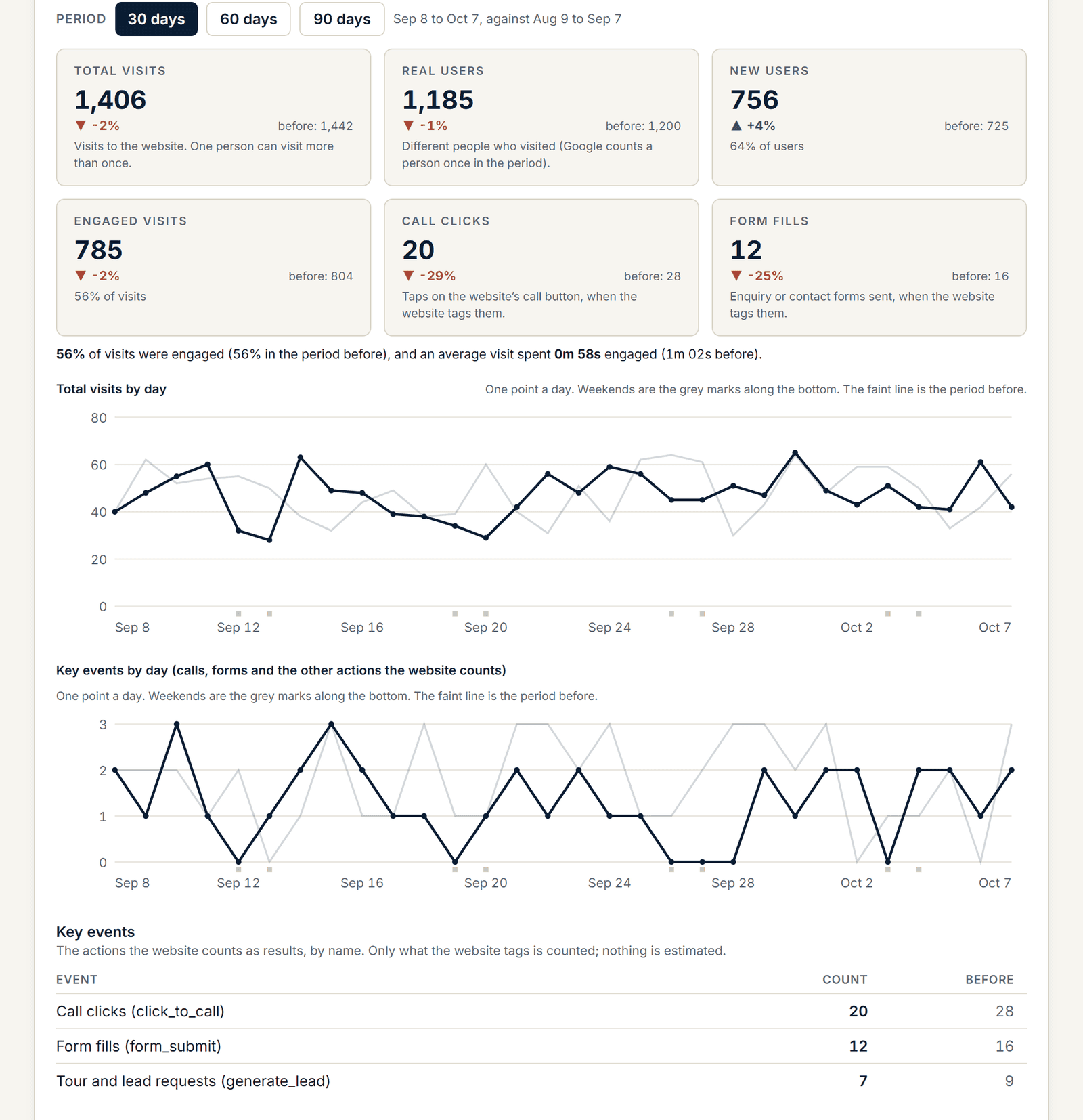
Six key figures: total visits, real users, new users, engaged visits (what “engaged” means is written under it), call clicks and form fills from your website’s own key events. A kind of event your website does not tag reads “not tagged,” never zero, because a zero would be a guess. Then the engagement rate and the average time engaged, a line of visits by day with the period before drawn faint, a second line for key events, and the key events by name.
Scroll to the right to see more data
Illustrative sample data in the Census Mastery interface.
Where visitors came from, and where they are
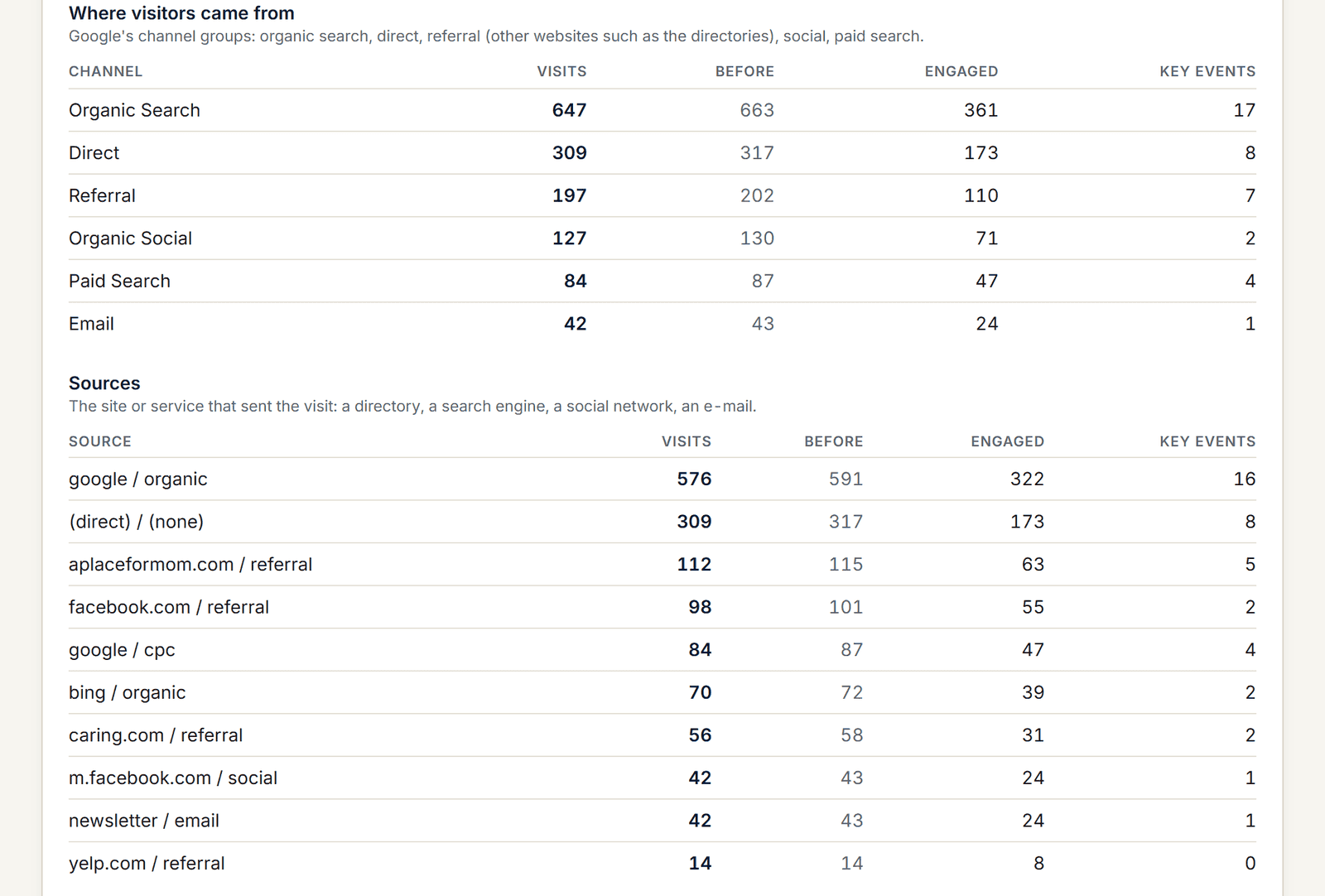
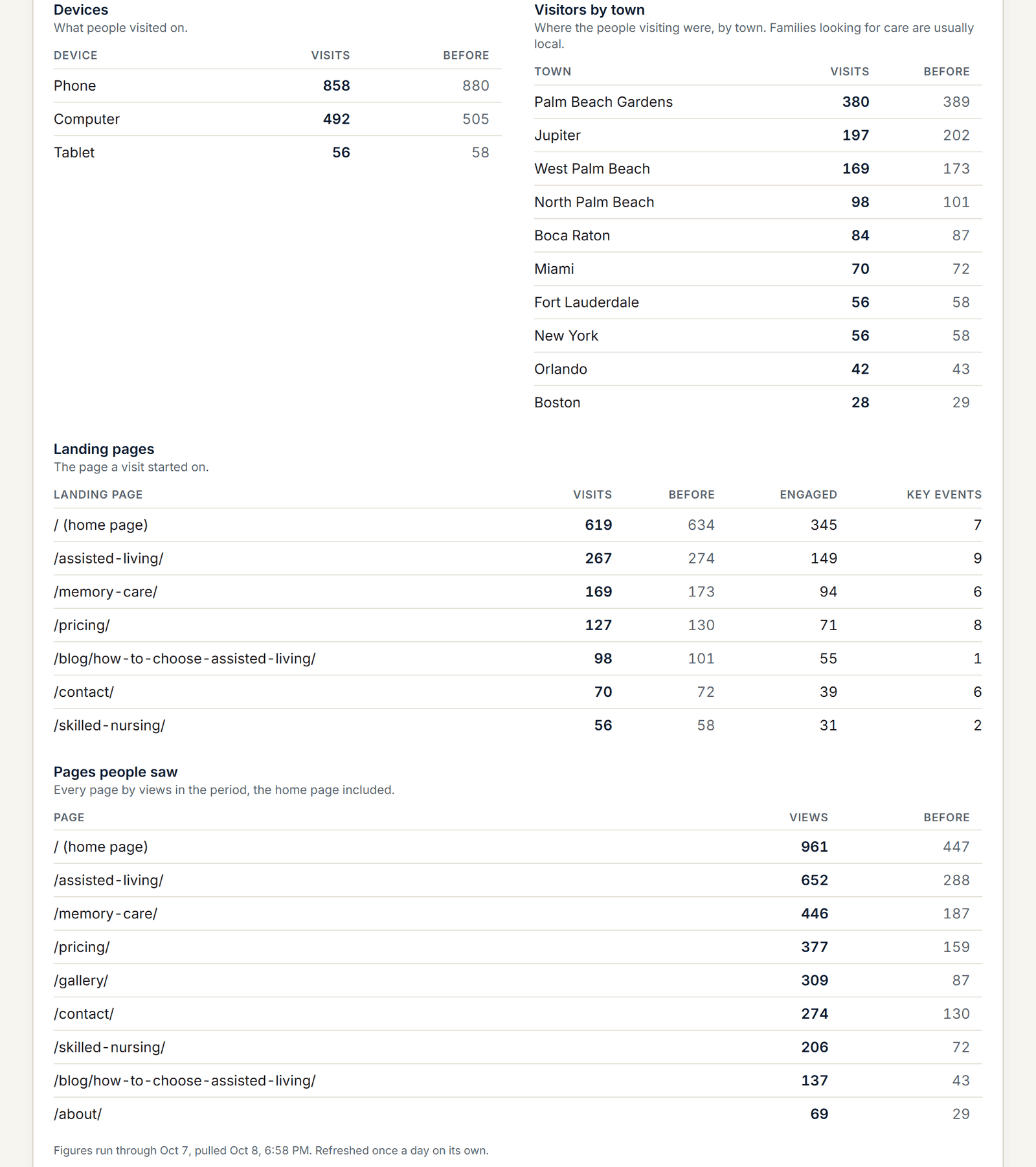
Google’s channel groups, then the sources behind them: a directory, a search engine, a social network. When A Place for Mom sends you 40 visits a month and Caring.com sends you none, that is the directory audit and the website numbers telling the same story from two sides. Devices, visitors by town, landing pages, and the pages list last.
Scroll to the right to see more data
Illustrative sample data in the Census Mastery interface.
On the Report Card, for everyone you name
“How you show in Google Search” is a section of every Report Card: the four figures, the target searches with position and distance to number one, the top five pages and searches. Your owner reads it without a login, on the same page as the score and the head-to-head.
Scroll to the right to see more data
Illustrative sample data in the Census Mastery interface.
Connected once, refreshed daily, never estimated
The same Google sign-in used for the Business Profile asks for read-only Search Console and Google Analytics access. Census Mastery picks the property that matches your website on its own; the property drop-down is always on the page if you have several. The numbers are pulled the moment the connection is made and refreshed once a day; “Pull the latest” refreshes now. Google reports two to three days behind, and the tool never writes a day Google has not reported. Every figure is Google’s.
Scroll to the right to see more data
Illustrative sample data in the Census Mastery interface.
Why it matters
A reputation score tells you how you look. Search Console tells you whether Google is showing you. Analytics tells you what people did once they arrived. Census Mastery gives you all three in one login, on every plan, because a 62 that gets 448 clicks a month and a 62 that gets 40 are two different problems.

“Absolutely reliable reporting and extremely detailed insights. Ronald’s team and tools have helped us maintain a census over 90 percent for five years.”
President, Sunny Hills Assisted Living, Florida.
Find out what the last family saw.
Pick a time and we will run your community’s Census Score with you on the call: your number, your three closest competitors, and the three plays that matter most. The report is yours whether you sign up or not. Senior living reputation management, done for you, from $79 a month. Works for assisted living, memory care, nursing homes, independent living and in-home care.
See my Census ScoreFree. No card. 20 minutes.
Prefer e-mail? Leave your details and we will send your score.
Your score is read from public pages and Google. The only family details we hold are the enquiries and leads in your own pipeline.