AI review replies
Fifteen unanswered reviews. Fifteen drafted replies. Ninety seconds. Every one HIPAA compliant.
One inbox for every review on every site the tool reads. “Write a reply with AI” drafts one. “Write replies” drafts every unanswered review at once, for all sites, Google only, or the directories without Google. You read, you edit if you want, you post. Once your Google profile is connected, posting to Google is one press. AI-written replies are on Full Census and Waitlist; on Census Watch you answer every review yourself from the same inbox.
Show me my inboxScroll to the right to see more data
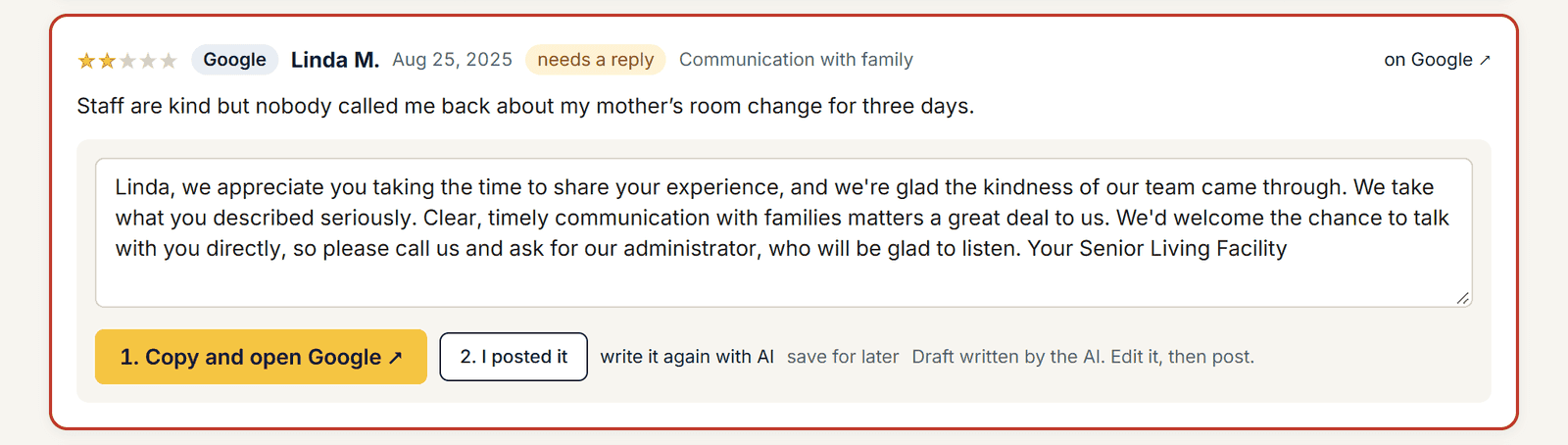
Illustrative sample data in the Census Mastery interface.
Replies that follow the rules of your industry
Senior living is not a pizza shop. A reply that argues with a grieving daughter is a second bad review. Every draft Census Mastery writes follows fixed rules: warm and plain, 40 to 90 words, thanks the reviewer by first name, mentions one specific thing from the review, worded differently from every other reply on your profile; never argues or admits fault; never repeats a number, date, room, or a staff member’s or family member’s name from the review; never offers an incentive; no exclamation marks in a critical reply; no AI-sounding language. Before a draft reaches you it is checked for invented numbers, dashes and AI vocabulary, with a rule-based fallback if the check fails.
Scroll to the right to see more data
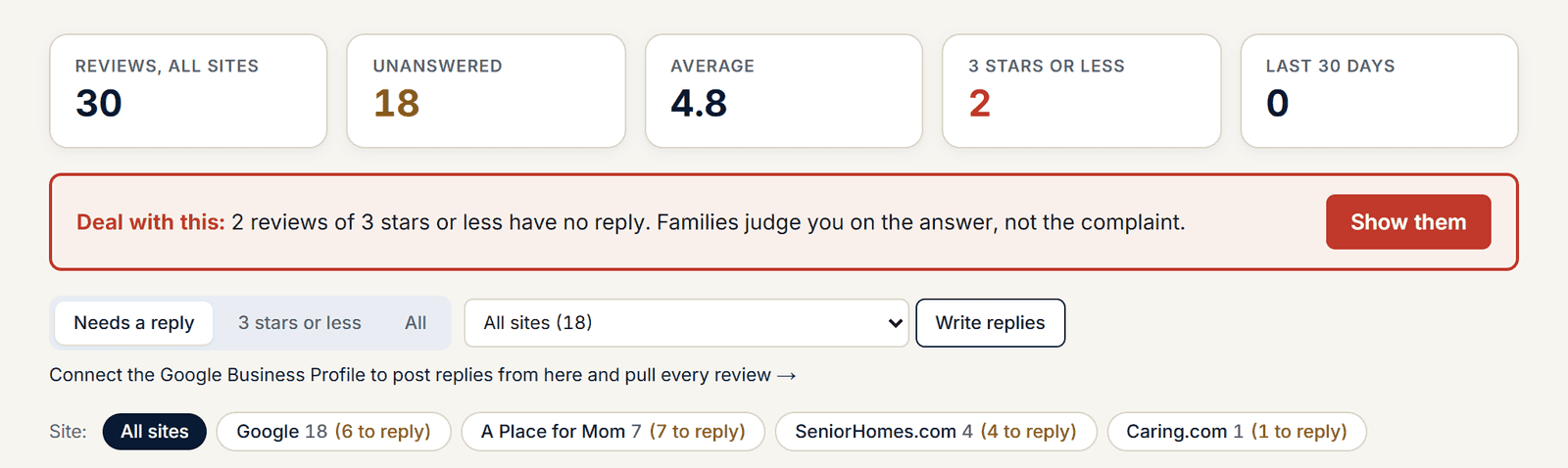
Illustrative sample data in the Census Mastery interface.
Every reply is HIPAA compliant
A reply that mentions a resident’s condition is a privacy breach, even when the family wrote it first. So the AI never confirms or denies that anyone is or was a resident, and never repeats or adds a health condition, medication, fall, hospital or hospice stay, care plan, room or date. A checker runs on every reply before it is shown, saved or posted. A reply that fails is never shown; it is replaced by a safe template. A reply you type yourself is refused until it passes the same check.
- Never confirms or denies that someone lives or lived with you
- Never a diagnosis, a medication, a fall, a hospital stay, a care plan, a room number or a date
- Checked before it is shown, before it is saved, and before it is posted
- Your own typed reply goes through the same checker
Pick the scope: all sites, Google only, or the directories
Some communities want every site answered at once. Some want Google handled first and Caring.com or A Place for Mom later. The box beside “Write replies” sets the scope: all sites, Google only, or the directories and review sites without Google. Filters for “Needs a reply,” “3 stars or less,” “All,” and by site keep the list short.
One inbox across every community
On Full Census and Waitlist, an operator with several communities gets one Reviews page with a card for every community: its review count, average, how many need a reply, and the three reviews to answer first.
Posting: one press on Google, two steps everywhere else
With your Google Business Profile connected, a Google reply posts from the inbox with one press. For Yelp, Caring.com and the other sites, “1. Copy and open Yelp” copies the reply and opens the page, and “2. I posted it” takes the review off the list and keeps it off after the next audit. A reply you post by hand on Google or Yelp is picked up by the next audit on its own.
Why it matters
Owner reply rate is one of the seven measures in your score, and it is the cheapest five points on the card. A family reading a 2-star review with a calm, kind owner reply underneath it sees a community that pays attention. A family reading the same review with silence underneath sees a community that does not.

“Absolutely reliable reporting and extremely detailed insights. Ronald’s team and tools have helped us maintain a census over 90 percent for five years.”
President, Sunny Hills Assisted Living, Florida.
Find out what the last family saw.
Pick a time and we will run your community’s Census Score with you on the call: your number, your three closest competitors, and the three plays that matter most. The report is yours whether you sign up or not. Senior living reputation management, done for you, from $79 a month. Works for assisted living, memory care, nursing homes, independent living and in-home care.
See my Census ScoreFree. No card. 20 minutes.
Prefer e-mail? Leave your details and we will send your score.
Your score is read from public pages and Google. The only family details we hold are the enquiries and leads in your own pipeline.